







- Your cart is empty Browse Shop
Choosing the wrong cloud infrastructure can leave a business paying for unnecessary resources, struggling with complicated integrations and facing expensive migration projects as it grows.
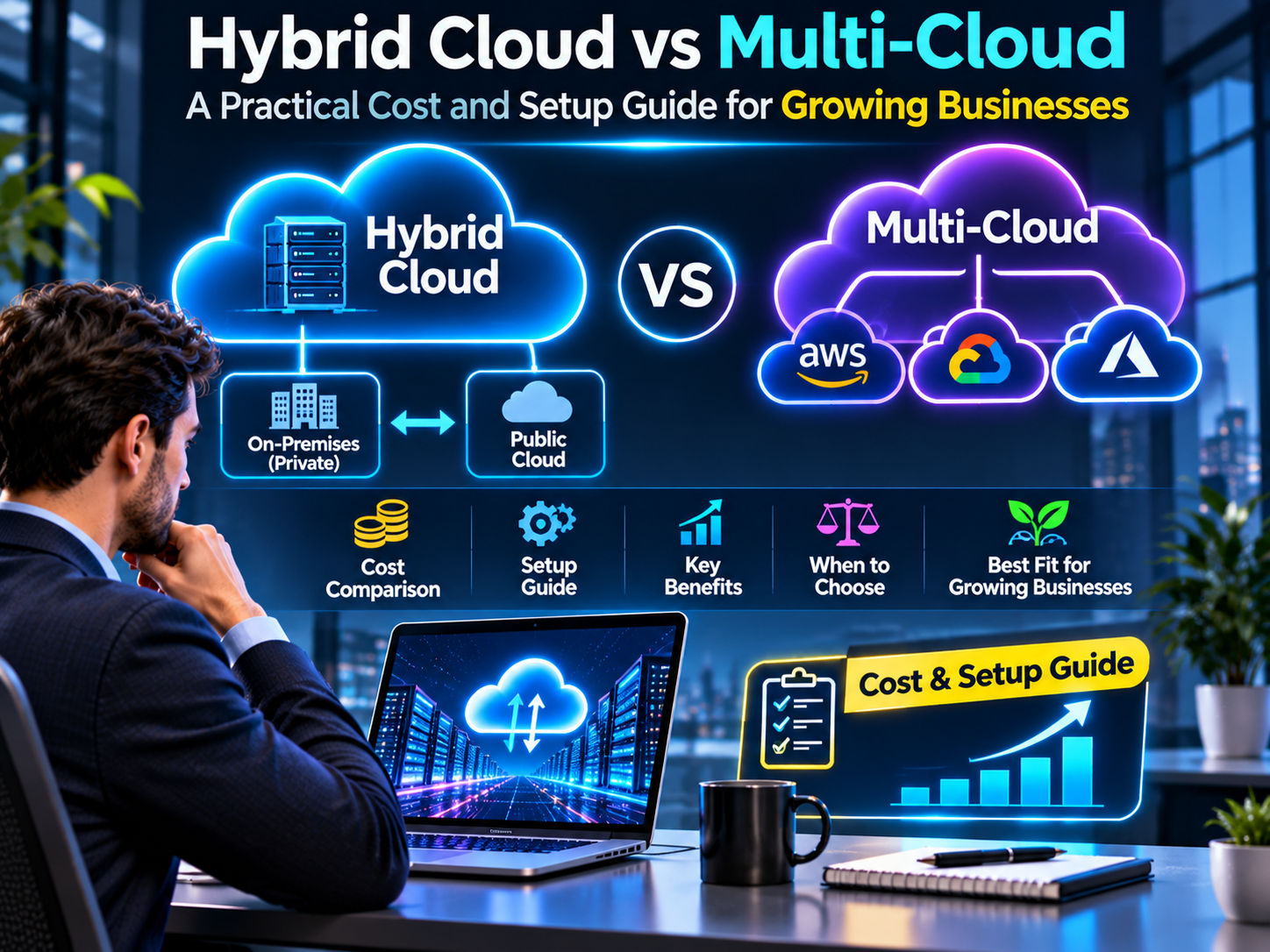
For many growing businesses, the decision comes down to hybrid cloud vs multi-cloud. Both approaches offer greater flexibility than relying exclusively on traditional IT infrastructure, but they address different business requirements.
Hybrid cloud is generally more suitable for businesses that need to retain existing private infrastructure while benefiting from public cloud services. Multi-cloud is better suited to organisations that need specialised services from different cloud providers or want to reduce dependence on a single vendor.
However, neither approach automatically reduces costs, improves security or guarantees business continuity.
For UK businesses with limited IT budgets, choosing the right cloud strategy requires a realistic assessment of infrastructure requirements, operational expenses, technical expertise and regulatory responsibilities.
This guide explains how both cloud models work, what they cost, how to implement them and which approach makes the most commercial sense for your business.
What Is Hybrid Cloud Computing?
Hybrid cloud computing is an infrastructure model that integrates private computing environments, such as on-premises servers or private clouds, with public cloud services. It allows businesses to retain control over selected applications and data while accessing the scalability, storage and computing capabilities of external cloud providers.
Rather than moving every application into the public cloud, businesses can distribute workloads according to operational requirements.
For example, a manufacturing company might retain its production management system on local infrastructure while using Microsoft Azure to support reporting, remote access and disaster recovery.
The two environments work together as part of an integrated infrastructure strategy.
How Does Hybrid Cloud Work?
A hybrid cloud environment typically includes private infrastructure, public cloud services, secure network connections and management tools.
Applications may exchange information between environments through controlled network connections, APIs or integration platforms.
Identity management, monitoring and security policies help maintain appropriate oversight across the infrastructure.
Practical Example of Hybrid Cloud
Consider a UK wholesale business operating an established inventory management system on local servers.
Replacing the system immediately could be expensive and disrupt daily operations.
Instead, the company could retain its existing infrastructure while hosting its customer-facing ecommerce website in the public cloud.
The website and inventory system could exchange stock information through a secure integration.
This allows the business to improve its digital customer experience without replacing every internal system at once.
What Is Multi-Cloud?
Multi-cloud is a cloud computing strategy that uses services from two or more cloud providers. Businesses adopt multi-cloud environments to access specialised technologies, improve supplier flexibility, distribute workloads and reduce reliance on a single provider, although managing multiple platforms can increase operational complexity and costs.
A business might use Amazon Web Services for application hosting, Google Cloud for data analytics and Microsoft Azure for another business application.
Unlike hybrid cloud, a multi-cloud strategy does not necessarily require private or on-premises infrastructure. IDC+1
How Does a Multi-Cloud Strategy Work?
Businesses select cloud services according to the requirements of individual workloads.
Each provider may offer different capabilities, pricing structures, infrastructure locations and management tools.
Some multi-cloud environments involve closely integrated applications. Others consist of relatively independent workloads operating on different platforms.
Practical Example of Multi-Cloud
Imagine a growing UK ecommerce retailer using AWS to host its online shop.
The retailer also uses Google Cloud’s BigQuery for analysing sales and customer behaviour.
Instead of transferring its entire ecommerce infrastructure to Google Cloud, the business uses each provider for a specific purpose.
This creates a multi-cloud environment without requiring the company to maintain physical servers.
Hybrid Cloud vs Multi-Cloud: What Are the Main Differences?
The fundamental difference concerns the infrastructure being combined.
Hybrid cloud integrates private infrastructure with public cloud services. Multi-cloud uses services from multiple cloud providers.
A business can also use both approaches simultaneously by connecting private infrastructure to services from several public cloud providers.
Infrastructure Ownership
Hybrid cloud may involve infrastructure that the business owns, leases or operates through a dedicated hosting arrangement.
Multi-cloud can operate entirely through external cloud providers, reducing the need to maintain physical hardware.
Management Complexity
Hybrid environments require coordination between private and public infrastructure.
Multi-cloud environments require expertise across different provider platforms, billing systems, security configurations and technologies.
Neither model is inherently simpler in every situation.
Control Over Data
Hybrid cloud may provide greater direct control over workloads retained within private infrastructure.
Multi-cloud allows businesses to select providers and regions according to their requirements.
However, actual control depends on system architecture, contractual arrangements and security configuration rather than the deployment model alone.
Vendor Lock-In
A multi-cloud strategy can reduce dependence on one provider when workloads are designed for portability.
Hybrid cloud can also improve flexibility by retaining selected systems outside a public cloud provider’s environment.
However, using multiple platforms does not automatically eliminate vendor lock-in.
Applications may still depend on proprietary databases, APIs or managed services that are difficult to replace.
What Are the Benefits of Hybrid Cloud?
Hybrid cloud computing is particularly attractive to businesses that already operate established IT infrastructure.
Protecting Existing Technology Investments
Businesses may have invested substantial amounts in servers, software licences and internal applications.
Hybrid cloud allows organisations to continue using suitable existing systems instead of replacing them prematurely.
Greater Flexibility During Cloud Migration
Not every application needs to migrate at the same time.
A hybrid approach allows businesses to transfer workloads gradually, reducing disruption and providing opportunities to evaluate performance.
Supporting Specific Data Requirements
Some organisations have contractual, operational or regulatory requirements that influence where particular information can be processed.
Hybrid infrastructure can help accommodate these requirements when properly configured.
Improving Scalability
Businesses can use public cloud resources to support workloads that experience fluctuating demand.
For example, an ecommerce platform might require additional capacity during seasonal sales periods.
However, applications must be designed to use that capacity effectively.
Supporting Disaster Recovery
A business can use cloud-based backup and recovery services to protect suitable on-premises workloads.
Recovery arrangements must still be tested regularly.
What Are the Disadvantages of Hybrid Cloud?
Hybrid cloud can introduce costs and technical responsibilities that are sometimes underestimated.
Maintaining private infrastructure requires hardware management, electricity, networking, software updates and technical support.
Connecting private and public environments also introduces additional security considerations.
Businesses may face integration difficulties when older applications were not designed to communicate with modern cloud services.
For companies without existing infrastructure or specialist IT requirements, establishing a private environment solely to adopt hybrid cloud may create unnecessary expense.
What Are the Benefits of Multi-Cloud?
Multi-cloud strategies can help businesses access a broader range of technologies and commercial options.
Access to Specialised Cloud Services
Different providers have strengths across application hosting, databases, analytics, machine learning and enterprise integrations.
Multi-cloud allows businesses to evaluate services independently rather than selecting every technology from the same supplier.
Greater Supplier Flexibility
Using multiple providers may improve negotiating flexibility and reduce dependence on a particular platform.
The benefit depends on whether applications and data can realistically move between providers.
Workload-Specific Cost Optimisation
One provider may offer a more suitable pricing structure for a specific workload.
Businesses can compare performance and total operating costs before selecting a service.
Geographic Flexibility
Different providers offer different infrastructure locations and service availability.
This can help organisations meet particular latency, customer location or data residency requirements.
Potential Improvements in Resilience
A carefully designed multi-cloud architecture may reduce exposure to certain provider-specific failures.
However, resilience requires deliberate engineering, data replication, recovery processes and regular testing.
Simply having accounts with two cloud providers does not provide automatic failover.
What Are the Disadvantages of Multi-Cloud?
Managing multiple providers can introduce significant operational challenges.
Each provider may have different interfaces, identity systems, terminology, pricing structures and security tools.
Technical teams need sufficient expertise to manage these differences.
Businesses may also incur additional costs when transferring data between cloud platforms or maintaining duplicate monitoring and security services.
Fragmented billing can make it difficult to understand total infrastructure spending.
For smaller businesses, these management expenses may exceed any savings achieved through selecting cheaper individual cloud services.
Hybrid Cloud vs Multi-Cloud: Which Is Cheaper?
Hybrid cloud may be cheaper when a business already owns suitable infrastructure and can continue using it efficiently. Multi-cloud may be cheaper when selected providers offer better value for specific workloads. However, the true cost depends on hardware, cloud usage, licensing, networking, technical staffing and ongoing management expenses.
Comparing monthly cloud subscription prices alone does not provide a reliable answer.
Initial Setup Costs
Hybrid cloud setup may require server upgrades, networking equipment, private infrastructure, integration work and security configuration.
Multi-cloud setup may require application migration, cloud account configuration, identity integration and additional management tools.
Computing and Storage Costs
Public cloud providers typically charge according to resources consumed or reserved.
These may include virtual machines, managed databases, storage capacity, storage operations and application services.
Hybrid infrastructure also involves the cost of purchasing, operating and eventually replacing private hardware.
Data Transfer and Egress Charges
Egress refers to data transferred out of a cloud provider’s environment.
Businesses operating across several platforms may incur charges when applications repeatedly exchange large quantities of information.
The UK’s Competition and Markets Authority concluded its cloud services market investigation in July 2025, identifying data transfer fees, interoperability barriers and software licensing practices among the issues affecting customer choice.
Subsequent updates in 2026 reported steps by major providers towards reducing certain egress charges and improving interoperability.
Businesses should therefore verify current pricing and switching terms rather than relying on historical information. GOV.UK+1
Software Licensing
Operating systems, databases and enterprise applications may have different licensing conditions depending on where they run.
Moving an existing application into another cloud environment could change its licensing costs.
Technical Staffing
Both cloud models require appropriate expertise.
A business saving £200 per month on computing resources could lose that saving if managing the additional infrastructure requires substantially more employee time.
Backup, Security and Monitoring
These services are essential components of infrastructure costs.
Operating several environments may require additional monitoring, backup storage, security tools and recovery arrangements.
Practical Cloud Computing Cost Examples for UK Businesses
The following examples use hypothetical budgets to illustrate how total ownership costs can influence a cloud strategy.
These are planning examples, not live provider quotations, industry averages or guaranteed implementation prices. All amounts exclude VAT.
Example 1: Hybrid Cloud for an Established SME
Consider a business with approximately 30 employees, an existing internal application server and a growing customer-facing website.
Its hypothetical initial setup budget includes £2,000 for infrastructure upgrades, £1,000 for networking and security configuration, and £2,000 for migration and integration.
This produces an estimated one-off setup cost of £5,000.
Its illustrative monthly operating costs are:
- Public cloud computing and storage: £250
- Private infrastructure maintenance and electricity: £150
- Connectivity and security services: £100
- Backup and monitoring: £100
- Technical administration: £200
The total monthly operating cost would be £800, producing a first-year expenditure of £14,600, including implementation.
This scenario assumes that suitable existing hardware can be retained without a major replacement during the first year.
Example 2: Multi-Cloud for a Growing Digital Business
Consider a similarly sized business operating a customer-facing application on one cloud platform and using another for analytics.
Its hypothetical implementation budget includes £2,500 for application migration, £1,500 for integrations and £1,000 for security and monitoring configuration.
The total initial setup cost is £5,000.
Its illustrative monthly operating costs are:
- Primary cloud infrastructure: £350
- Secondary cloud services: £200
- Data transfer and networking: £100
- Security, backup and monitoring: £150
- Technical administration: £250
The combined monthly operating cost would be £1,050, producing a first-year expenditure of £17,600, including implementation.
What Do These Cost Examples Show?
Under these assumptions, the hybrid environment costs £9,600 annually to operate, while the multi-cloud environment costs £12,600.
The difference is £3,000 per year.
However, the outcome could reverse if the hybrid business needed expensive server replacements or if the multi-cloud business reduced management complexity through efficient service selection.
These scenarios also represent different business architectures rather than a controlled, like-for-like performance comparison.
A meaningful purchasing decision requires equivalent workload capacity, availability targets, security requirements and service levels.
How to Calculate the True Cost of Cloud Infrastructure
Businesses should calculate the total cost of ownership over an appropriate period, such as three years.
Include initial implementation, recurring cloud charges, private infrastructure expenses, connectivity, licensing, staff time, maintenance and expected hardware replacements.
Possible migration or exit costs should also be considered.
The FinOps Foundation recommends assessing cloud expenditure against business value and establishing shared accountability between finance, engineering and operational teams. FinOps Foundation+1
For an ecommerce business, a useful measurement might be infrastructure cost per completed order.
For a software company, cost per active customer or completed application transaction may provide more meaningful information than the total cloud bill alone.
How to Set Up a Hybrid Cloud Environment
A successful hybrid cloud migration begins with understanding which workloads should remain private and which would benefit from public cloud services.
Step 1: Assess Your Existing Infrastructure
Identify applications, servers, databases, software licences and existing dependencies.
Determine which systems remain supported and which require replacement.
Step 2: Classify Applications and Data
Evaluate operational importance, performance requirements, information sensitivity and recovery needs.
Avoid retaining infrastructure simply because the business has historically operated it.
Step 3: Select a Public Cloud Provider
Compare suitable providers according to service availability, integration compatibility, pricing, support and contractual requirements.
Step 4: Establish Secure Connectivity
Connect environments using suitable network arrangements, such as encrypted VPN connections or dedicated private connectivity where justified.
Configure network access according to operational requirements.
Step 5: Implement Identity and Security Controls
Establish appropriate authentication, access permissions, encryption and monitoring.
Ensure that responsibilities for private and public infrastructure are clearly assigned.
Step 6: Migrate Workloads Gradually
Begin with a manageable application or non-critical workload.
Test functionality, performance, integrations and rollback procedures before moving more important systems.
Step 7: Monitor and Optimise
Review infrastructure performance, security events, backup arrangements and spending.
Hybrid infrastructure requires ongoing management rather than a one-time setup.
How to Implement a Multi-Cloud Strategy
Multi-cloud should begin with a clear commercial or technical reason for introducing another provider.
Step 1: Define Your Business Objectives
Determine whether the organisation needs specialised services, greater resilience, geographical coverage or improved supplier flexibility.
Adding providers without a defined objective can increase complexity without creating meaningful value.
Step 2: Choose a Primary Cloud Platform
For many SMEs, establishing one primary cloud environment simplifies initial management.
Additional providers can then be introduced for clearly defined workloads.
Step 3: Compare Provider Services
Evaluate providers such as AWS, Microsoft Azure and Google Cloud against actual application requirements.
Consider computing, storage, database services, technical support, networking and licensing.
Step 4: Design Application Integrations
Determine how applications will exchange information.
Where practical, keep tightly connected workloads together to reduce unnecessary data movement and latency.
Step 5: Establish Consistent Governance
Use appropriate identity controls, resource naming conventions, logging, deployment standards and cost allocation practices.
Infrastructure-as-code tools may help teams manage compatible resources consistently across platforms.
Step 6: Configure Cost Management
Set spending budgets, billing alerts and resource ownership policies.
Budgets and alerts help identify spending changes but should not be mistaken for guaranteed spending limits.
Step 7: Test and Expand Carefully
Validate the secondary environment using a limited workload before extending the architecture.
Review whether the additional provider delivers enough measurable value to justify its ongoing costs.
AWS vs Microsoft Azure vs Google Cloud
There is no universally superior cloud provider.
The best choice depends on the business’s applications, existing technology, technical expertise and budget.
Amazon Web Services (AWS)
AWS offers a broad range of computing, storage, database, networking and application services.
It may suit businesses operating web applications, ecommerce platforms or scalable digital products.
Its extensive service portfolio can also introduce complexity for inexperienced teams.
Microsoft Azure
Microsoft Azure may be particularly attractive to organisations already using Microsoft-based infrastructure and enterprise applications.
Its suitability depends on existing systems, licensing conditions and integration requirements.
Google Cloud
Google Cloud offers services for application infrastructure, data analytics, artificial intelligence and managed computing.
It may be attractive to businesses with significant analytics or data processing requirements.
Should Your Business Use All Three?
Not necessarily.
Using three major providers can increase technical staffing requirements, billing complexity and security responsibilities.
For many growing businesses, one well-managed primary provider and a carefully selected secondary service will be more practical.
Cloud Security and UK GDPR Compliance
Neither hybrid cloud nor multi-cloud is automatically more secure or compliant.
Security depends on how infrastructure is designed, configured, monitored and maintained.
Shared Responsibility
Cloud providers typically protect the underlying infrastructure while customers retain responsibilities involving their data, user accounts, applications and configurations.
The precise division of responsibilities varies by service.
A managed database, for example, may involve different customer responsibilities from a self-managed virtual server.
Identity and Access Management
Businesses should restrict access according to employee responsibilities.
Multi-factor authentication, least-privilege permissions and regular access reviews can reduce exposure to compromised accounts.
Data Encryption
Sensitive information should receive appropriate protection during transmission and storage.
Organisations should also consider key management and access arrangements.
UK Data Residency
Using a UK cloud region may help satisfy particular data location requirements.
However, UK GDPR does not impose a general requirement that all personal data must remain physically within the UK.
The legal entity providing the cloud service, overseas access, subprocessors and international transfer arrangements may all be relevant.
The Information Commissioner’s Office explains that using a cloud provider based outside the UK is very likely to involve a restricted transfer, while UK-based providers may have their own responsibilities for onward transfers. ICO
Backup and Incident Response
Businesses need clear procedures for responding to security incidents and restoring affected services.
Cloud migration does not remove responsibility for protecting customer information.
Where appropriate, organisations should seek qualified legal and cybersecurity advice regarding specific regulatory or security requirements.
Which Cloud Model Offers Better Performance and Scalability?
Both models can support scalable applications, but their performance depends on architecture.
Hybrid cloud may be particularly suitable when local processing provides operational advantages.
For example, a manufacturing system may need to continue operating during a temporary internet outage.
Multi-cloud may be useful when a business requires a specialised service or wants to deploy workloads in different geographical regions.
However, distributing closely connected applications across several providers can increase latency and networking costs.
A database and its associated application may perform better when located within the same cloud environment.
The most effective architecture places workloads where they can operate reliably and economically rather than distributing them unnecessarily.
Hybrid Cloud vs Multi-Cloud for Disaster Recovery
Disaster recovery is frequently cited as a reason for adopting multiple cloud environments.
However, the architecture must support actual recovery requirements.
Recovery Time Objective (RTO)
The RTO describes the target time for restoring a service after a disruption.
A business that cannot tolerate more than one hour of downtime needs a recovery architecture capable of meeting that requirement.
Recovery Point Objective (RPO)
The RPO describes the acceptable amount of data loss measured in time.
An ecommerce business may require frequent backups or replication to reduce the risk of losing recent orders.
Does Multi-Cloud Guarantee Business Continuity?
No.
A multi-cloud environment may still depend on a shared identity provider, DNS service, network connection or database.
Failure of a shared dependency can affect several environments simultaneously.
Businesses should evaluate whether simpler multi-region recovery within a single provider can meet their requirements before investing in cross-provider failover.
How to Reduce Cloud Computing Costs
Cloud cost optimisation should be an ongoing business practice.
Right-Size Computing Resources
Avoid paying for virtual machines and database capacity that significantly exceed actual requirements.
Review performance measurements before reducing resources.
Remove Unused Infrastructure
Unattached storage, abandoned test environments and inactive services can generate unnecessary charges.
Review Storage Requirements
Different storage classes may offer better value for infrequently accessed information.
Consider retrieval charges and minimum storage periods before moving data.
Use Committed Pricing Carefully
Some providers offer discounts in exchange for usage or spending commitments.
These arrangements may benefit predictable workloads but can create unnecessary expenditure if requirements change.
Reduce Unnecessary Data Transfers
Keep applications close to frequently accessed databases and avoid duplicating large datasets without a defined purpose.
Introduce FinOps Practices
FinOps combines financial accountability with technology management.
Assigning costs to applications, departments or business activities helps organisations understand which resources deliver value and where improvements are needed. FinOps Foundation+1
Common Cloud Migration Mistakes Growing Businesses Should Avoid
One of the biggest mistakes is assuming that moving infrastructure to the cloud automatically makes it cheaper.
Applications transferred without optimisation may continue consuming unnecessary resources.
Another common problem is overlooking technical dependencies. An older application may rely on local databases, authentication systems or third-party integrations that become difficult to access after migration.
Businesses should also avoid selecting multiple providers purely to follow industry trends.
Other costly mistakes include inadequate backup testing, unclear infrastructure ownership, excessive access permissions and committing to long-term cloud contracts before understanding actual usage.
A phased migration with clear acceptance criteria and a tested rollback plan is generally preferable to moving every system simultaneously.
Which Cloud Strategy Is Best for Your Business?
The right decision depends on the organisation’s existing infrastructure and growth plans.
Choose Hybrid Cloud If:
Your business operates essential legacy applications, has suitable private infrastructure, requires local processing or needs a gradual migration strategy.
Hybrid cloud can be particularly practical for established organisations that cannot immediately move every workload into public cloud services.
Choose Multi-Cloud If:
Your business requires specialised services from different providers, has clearly defined supplier diversification objectives or needs capabilities that cannot be obtained economically through one platform.
The organisation should also have sufficient technical resources to manage the additional complexity.
Choose Single-Cloud If:
Your business has relatively straightforward infrastructure requirements, limited technical resources or a small operational budget.
A single provider can offer scalable computing, managed databases, backups and recovery services without introducing unnecessary cross-platform management.
For many UK SMEs, single-cloud is the most sensible starting point.
Businesses should expand into hybrid or multi-cloud infrastructure when a genuine operational requirement justifies the change.
What Does Cloud Infrastructure Mean for Websites and Ecommerce Businesses?
Most SMEs do not need an enterprise-grade multi-cloud architecture to operate a successful website or online shop.
Their priorities are usually reliable hosting, fast page loading, appropriate security, dependable backups and sufficient capacity during periods of increased demand.
A growing ecommerce business may benefit from managed hosting, a content delivery network and scalable application infrastructure before considering more complicated cloud arrangements.
Businesses should evaluate website performance through meaningful measurements such as loading speed, availability, conversion rates and operating costs.
More infrastructure complexity does not necessarily create a better customer experience.
Conclusion: Hybrid Cloud vs Multi-Cloud for Growing Businesses
When comparing hybrid cloud vs multi-cloud, the objective should be to select an infrastructure model that supports business growth without introducing unnecessary costs or operational complexity.
Hybrid cloud offers flexibility for organisations retaining existing infrastructure while adopting public cloud services.
Multi-cloud provides access to technologies from different providers and can improve supplier flexibility when carefully designed.
However, both approaches require appropriate security, reliable integrations, cost management and technical oversight.
For UK SMEs, a well-managed single-cloud environment may remain the most practical solution until specific business requirements justify a more complex architecture.
Before making a decision, assess your total ownership costs, application dependencies, regulatory responsibilities and long-term growth plans.
The best cloud strategy is not the one that uses the most advanced infrastructure. It is the one that delivers reliable performance, manageable costs and measurable business value.
10. FAQ Section
What is the main difference between hybrid cloud and multi-cloud?
Hybrid cloud integrates private computing infrastructure with public cloud services. Multi-cloud uses services from two or more cloud providers. A business can also combine both approaches within its infrastructure strategy.
Is hybrid cloud cheaper than multi-cloud?
Hybrid cloud may be cheaper when a business already owns suitable infrastructure. Multi-cloud may offer savings through workload-specific provider selection. Actual costs depend on computing usage, hardware, licensing, networking and technical management.
Can a business use hybrid cloud and multi-cloud together?
Yes. A business can connect private infrastructure to multiple public cloud providers. This creates a hybrid multi-cloud environment, although managing it may require additional expertise and operational resources.
Which cloud strategy is best for small businesses?
A single-cloud environment is often the most practical starting point for small businesses. Hybrid cloud is suitable when existing private systems must be retained, while multi-cloud can be beneficial when distinctive requirements justify additional providers.
Does multi-cloud prevent vendor lock-in?
Multi-cloud can reduce reliance on one provider, but it does not automatically eliminate vendor lock-in. Applications may still depend on proprietary services, APIs or databases that require significant redevelopment to migrate.
Is hybrid cloud more secure than multi-cloud?
Neither model is inherently more secure. Security depends on configuration, access management, monitoring, encryption, software maintenance and the organisation’s ability to manage its infrastructure effectively.
Does UK GDPR require cloud data to be stored in the UK?
No. UK GDPR does not generally require all personal data to remain within the UK. However, businesses must comply with applicable international data transfer requirements and ensure appropriate protection when using cloud services.
How can businesses reduce their cloud computing costs?
Businesses can reduce unnecessary expenditure by right-sizing resources, removing unused services, reviewing storage requirements, limiting unnecessary data transfers and introducing appropriate FinOps practices.

Build Reliable Digital Infrastructure That Supports Your Business Growth
Choosing the right technology is an important part of growing a business, but additional complexity does not always deliver better results.
At CRAZILS, we help UK businesses and international clients strengthen their digital presence through practical, scalable and business-focused solutions.
Our services include:
- Web Design & Development
- Ecommerce Solutions
- Website Maintenance & Support
- UI/UX Design
- Business Consultancy
- SEO & Digital Marketing
Whether you’re launching a new website, improving an existing ecommerce platform or reviewing your digital growth strategy, we can help you explore solutions aligned with your business requirements and long-term objectives.
Contact CRAZILS to discuss your next digital project.
Website: https://crazils.com
Email: info@crazils.com
Phone / WhatsApp: +44 7897 053081
WhatsApp: https://wa.me/447897053081
CRAZILS — Digital Solutions. Real Growth.
Related News

24 November 2026